
Search for answers or browse our knowledge base.


An Early Warning is the notification HEAL raises when a service shows abnormal behavior that could affect application or service performance. The Early Warning report drills into one signal.
Open an Early Warning report
1. Open the Signals tab. See Navigating Signal Tab.
2. Click the Early Warning ID in the list, or click the Early Warning link in an email notification.

What’s on the screen
1. Signal Id. Unique identifier for the Early Warning.
2. Status. Open, Closed, or Upgraded. Open means the signal is still active. Closed means resolved.
3. Severity. How intense the signal is.
4. Signal Timeframe. Start time when the signal opened, end time when it closed or was upgraded.
5. Timeline. Chronological breakdown of affected services. The MLE builds the sequence using ensemble modeling. You only see services in applications you have access to.
6. Violated KPI. Name of the KPI that crossed its threshold.
7. Current KPI Value. The KPI’s value at the time of the event.
8. Normal Operating Range. The NOR for the KPI. See Service Details Dashboard.
9. Anomaly Score. A number between 0 and 1 that reflects how severe the event is. Higher means more severe.
- Shown only when the MLE generated the event.
- Not applied to events from a Static Operating Range (SOR).
10. Event expand or collapse. Expand to see every event for a service in time order. Collapse to clear the view.
11. Root Cause Walk. A visual map of the services that may be the root cause. Built from application topology and KPI relationships. See Root Cause Analysis.
12. ML Insights. Top ten critical metrics for services in the timeline. See View ML Insights.
13. Solution Recommendation. Top three suggested solutions for the root cause. See Solution Recommendation.
14. Related Signals. Other Early Warnings or Problems linked to this one. If the Early Warning has been upgraded to a Problem, the Problem ID appears here.
Lifecycle of an Early Warning
1. Detection. An Early Warning fires when HEAL detects an event in a service.
2. Aggregation. Events from the same service or services on the same line are merged into one Early Warning.
3. Expansion. If a service that is not on the same line also has events, a separate Early Warning is created.
4. Mitigation. When a metric has no events for a set interval, it is treated as back to normal and the Early Warning closes.
5. Resolution. If transactions on an entry-point service in the path of the Early Warning’s services are affected, the Early Warning is upgraded. HEAL creates a Problem and links the two. The Problem is resolved once the root cause is fixed.
Example
If Bookings DB has events, an Early Warning is created.
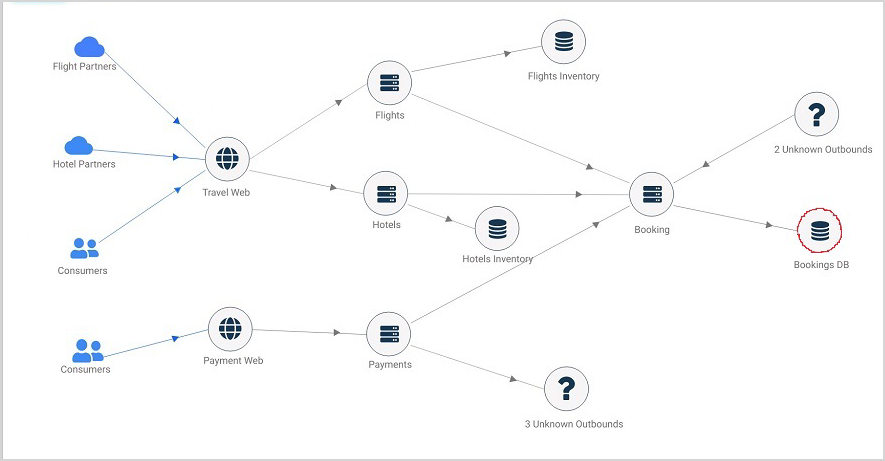
There are three impacted paths.
- Path 1. Bookings DB → Booking → Hotels → Travel Web
- Path 2. Bookings DB → Booking → Flights → Travel Web
- Path 3. Bookings DB → Booking → Payments → Payments Web
The timeline includes services along these paths where events were detected. A new Early Warning is created if a service outside these paths also has events.
Next
- View Problem Report . open one Problem.
- Root Cause Analysis . see the Root Cause Walk.
- View Solution Recommendation . suggested fixes.
