
How Can We Help?
Search for answers or browse our knowledge base.


An Early Warning catches patterns that may lead to a service outage. HEAL raises one when a service starts behaving abnormally but the entry-point services are still inside their SLA. The point is to act before users feel anything.
When an Early Warning fires
- A metric breaches its Normal Operating Range (NOR).
- Transaction volume or request count deviates significantly from historical patterns.
View Early Warnings
1. Log in to the HEAL UI and click the Incidents icon in the left-hand menu. The Incident page opens.
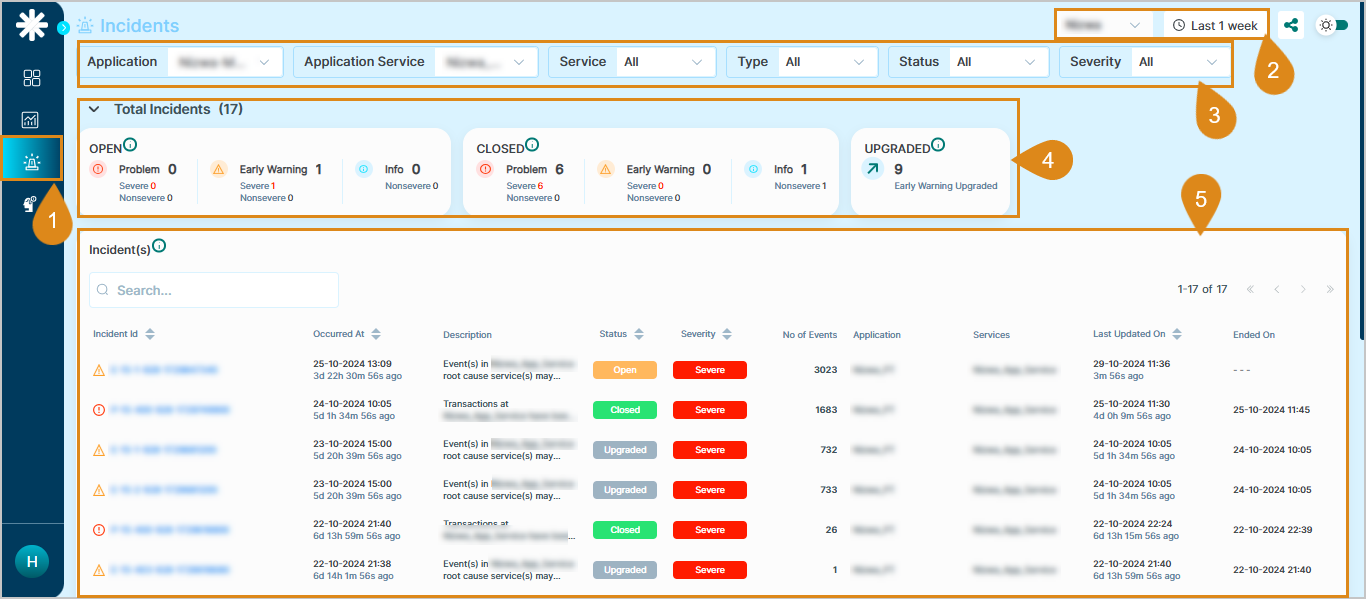
2. Pick a service and a time duration from the dropdowns.
3. Filter by application, service, type, status, or severity.
4. Read the Incidents Summary.
- Open events. Total open events broken into Problem, Early Warning, and Info.
- Closed events. Total closed events broken into Problem, Early Warning, and Info.
- Upgraded. Total Early Warnings that have been upgraded.
5. Use the incident list below the summary. Each row shows event ID, occurrence time, status, severity, application, service, event count, last updated time, and end time.
Tip. Incident IDs that start with
E are Early Warnings. That makes them easy to spot in the list.Next
- Incident Details . open one incident.
- Root Cause Analysis . automated RCA in HEAL.
- Anomaly Detection (AD) . how HEAL spots deviations.
