
Search for answers or browse our knowledge base.


When HEAL raises a Problem or Early Warning, it also proposes the top three solutions for the root cause. The recommendations come from historical tickets that HEAL has organized into categories like disk issues or database out-of-memory errors.
Open Solution Recommendation
1. Open the Signals tab. See Navigating Signal Tab.
2. Click the Signal ID in the list, or click the link in an email notification, to open the Signal Report.
3. Open the Solution Recommendation tab on the Signal Report (Warning or Problem report).
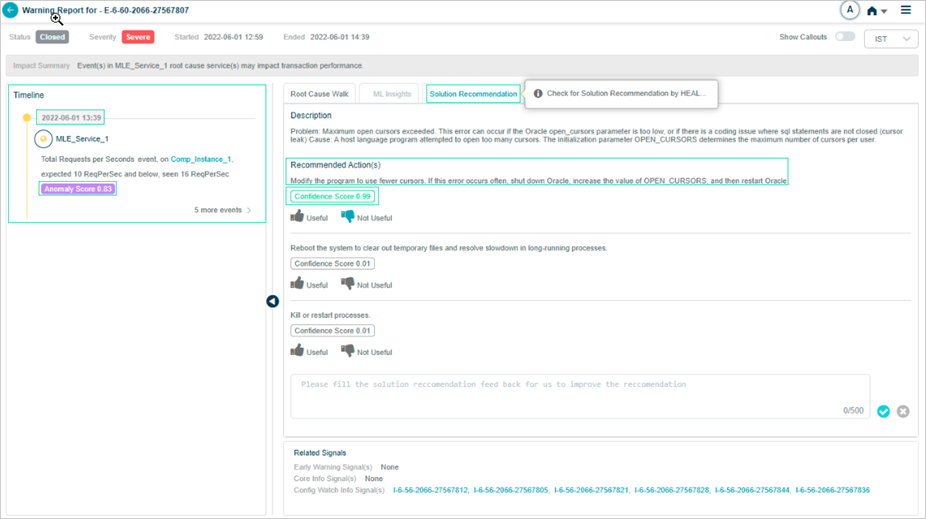
What’s on the screen
The Solution Recommendation tab on the right pane shows:
Description. A summary of the signal.
Recommended action(s). The proposed fix for the Problem or Early Warning.
Confidence Score. How confident HEAL is in the suggestion.
Useful or Not Useful. Thumbs up if the solution worked, thumbs down if it did not.
Feedback. Free-text feedback to improve future recommendations.
Why use Solution Recommendation
- Faster shared understanding. Helps IT teams understand the event and feeds future suggestions.
- Lower risk. Validating a solution before applying it cuts the chance of new issues or making the existing one worse.
- Higher accuracy. Validated solutions reduce errors and downtime, making sure the fix matches the problem.
Next
- Root Cause Analysis . trace the cause of a signal.
- View ML Insights . top metrics inside a signal.
- View Problem Report . open one Problem.
