
How Can We Help?
Search for answers or browse our knowledge base.


Open the Incident Details page to read everything HEAL’s AIOps engine knows about a specific incident: when it started and ended, what kind of incident it is, the entities affected, the linked early warning, and the chatbot for follow-up questions.
Open an incident
Click any Incident ID on the Incident Details page to open it.
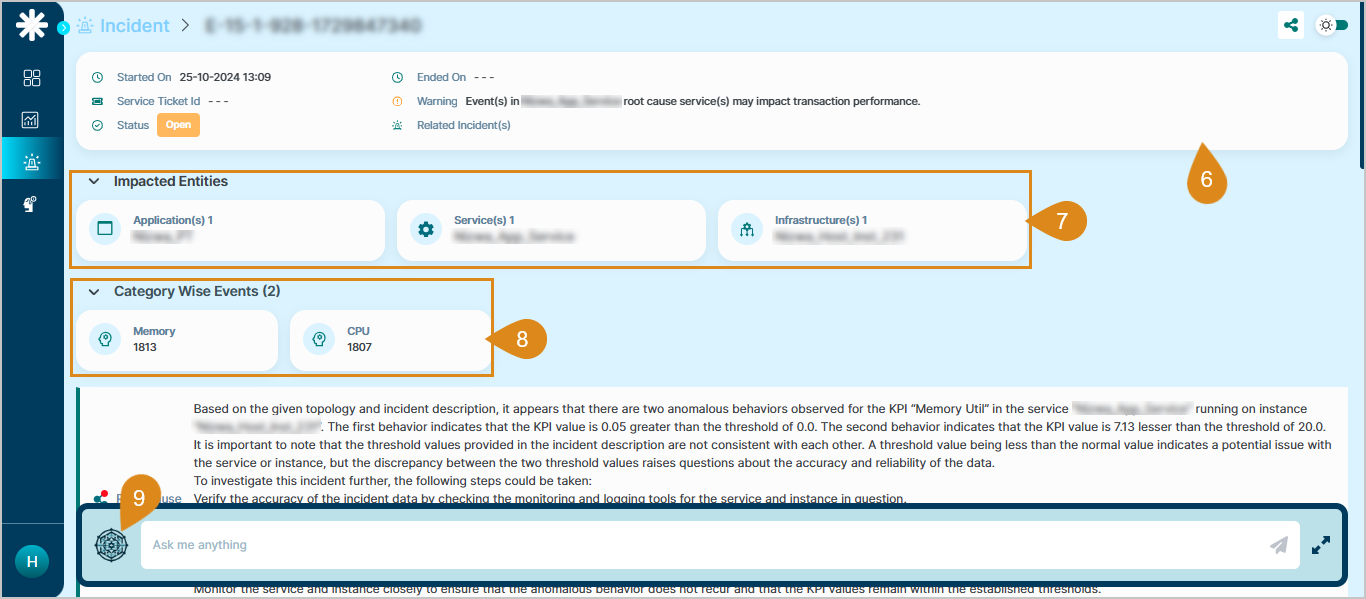
What’s in the header
- Started On. When the incident began.
- Ended On. When the incident closed.
- Status. Current state of the incident.
- Type. Incident type.
- Service Ticket ID. Linked ticket identifier.
- Warning details. Linked early-warning information.
- Related incidents. Other incidents tied to this one (if any).
- Impacted entities. Applications, services, and other resources affected.
- Total event count. Broken down by category.
RCA Assist
Click the RCA Assist icon to open or minimize the chatbot panel for AI-generated answers.
Next
- Early Warning . act before user-facing issues occur.
- Root Cause Analysis . automated RCA in HEAL.
- Gen AI assistant (HEAL Chatbot) . ask incident questions in plain English.
