
How Can We Help?
Search for answers or browse our knowledge base.


HEAL runs automated Root Cause Analysis (RCA) by correlating forensic event data from many sources and pinpointing the signals that triggered the incident.
How HEAL finds the root cause
After events are correlated, HEAL applies machine-learning causal analysis and graph traversal to trace the failure to its origin. The result is the first true causal event, not just the earliest, based on contextual dependencies across services.
Heads up. The root cause is not always the first event detected. HEAL uses an internal knowledge graph to resolve complex causal paths.
View the root cause
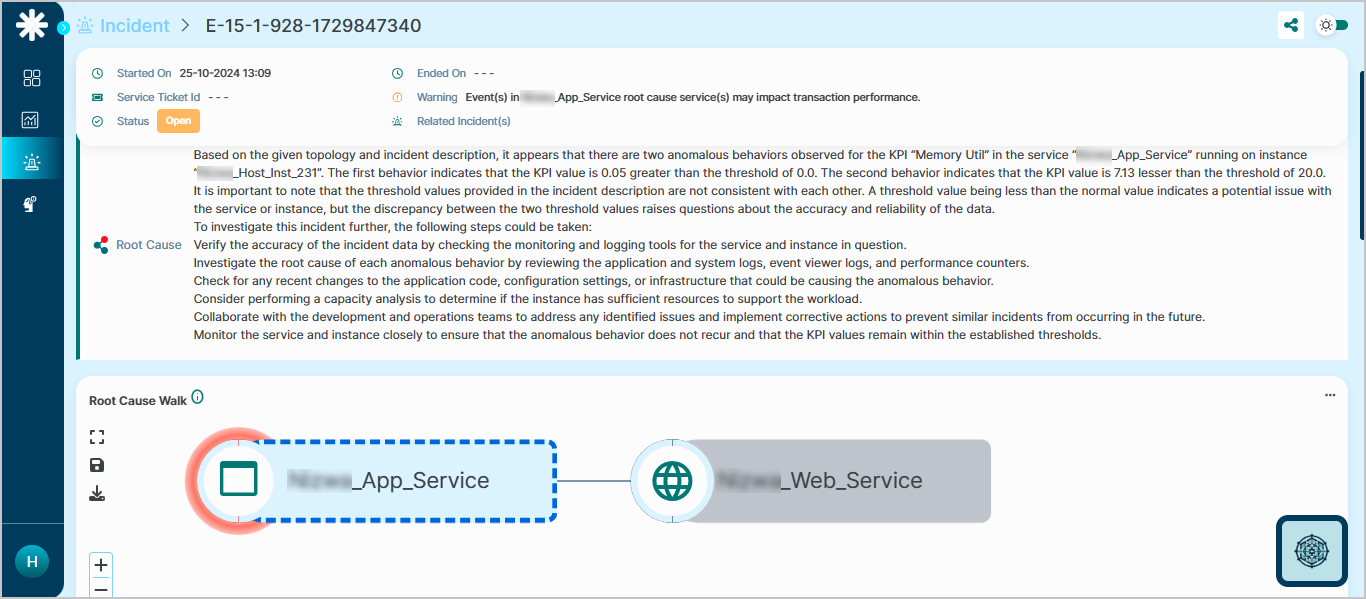
On the incident detail page, scroll to the Root Cause section. You will find:
- A textual explanation of the fault and the affected service or instance.
- Recommended investigation steps for whatever triggered the incident.
- A Root Cause Walk diagram that highlights the primary impacted service and its dependency path.
Next
- Root Cause Walk . full walkthrough of the RCA view.
- View Solution Recommendation . suggested fixes.
- View ML Insights . top metrics inside a signal.
